
Black specks in extrusion look simple on the product, but they are rarely a single-cause problem. A dark particle in a pipe, profile, sheet or film can come from degraded polymer inside the barrel, old material left after a changeover, contaminated regrind, a screen pack that is not filtering enough, or deposits that release from the die.
That is why the first response should not be to clean everything at once. A full teardown may be necessary in some cases, but it is the most expensive diagnostic tool. The faster route is to read the contamination pattern, separate internal generation from external introduction, and then choose the smallest intervention that matches the evidence.
For the broader symptom map, use the plastic extrusion troubleshooting guide. If the evidence points to retained material in the screw and barrel, use clean extruder screw and barrel. If the evidence points to die deposits, use the extrusion die cleaning workflow.
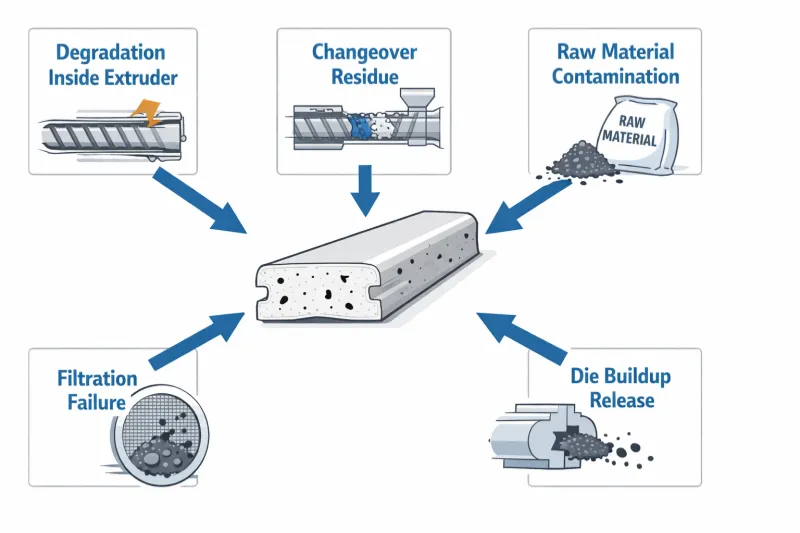
Quick Answer
When black specks appear in extrusion, classify the pattern before changing settings or opening the line:
- Check whether the specks are random, periodic, startup-related, changeover-related or batch-related.
- Decide whether the evidence points to internal generation or external contamination.
- Review recent events: shutdown, restart, color change, material change, regrind change or screen change.
- Inspect low-cost checkpoints first: material sample, hopper, conveying path, screen pack history and die lip.
- Clean or disassemble only the area supported by the evidence.
| Pattern | Likely direction | First check |
|---|---|---|
| Worse after startup or restart | Degraded or retained material | Heat history, residence time and stop duration. |
| Gradually increases with runtime | Internal degradation or die build-up | Die lip, adapter and dead-spot history. |
| Appears after color or material change | Changeover residue | Purge record and hidden retention zones. |
| Tracks one material batch or regrind lot | External contamination | Material sample and conveying path. |
| Changes after screen change | Filtration issue | Screen pack mesh, sealing and installation. |
1. Read the Pattern First
The occurrence pattern is the fastest clue. Before touching temperature, screw speed or screen mesh, record when the specks appear and how they behave.
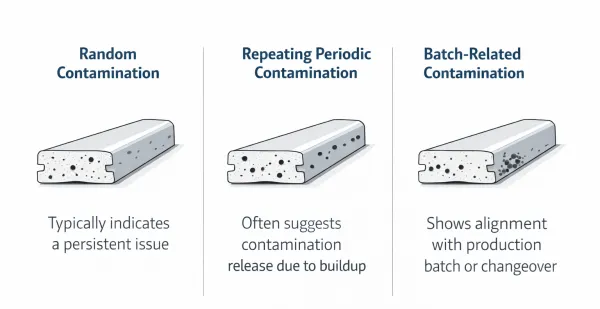
Random specks suggest material handling contamination, regrind quality issues or small pieces of old residue releasing from hidden zones. Periodic specks point more strongly to die build-up, adapter deposits or a repeating release pattern. Startup-heavy specks often come from retained degraded polymer. Batch-related specks usually move with a material lot, supplier change, regrind source or conveying event.
Do not skip this step. A five-minute pattern note can prevent a four-hour teardown in the wrong place.
2. Separate Internal Generation From External Introduction
The most important fork is whether the black specks are being generated inside the process or introduced before the material reaches the screw.
Internal generation is more likely when specks look charred, increase after long heat exposure, worsen after stop-start cycles, or continue even when clean virgin material is used. Common internal sources include overheated material, excessive residence time, screw/barrel dead zones, adapter stagnation and die deposits.
External introduction is more likely when the defect follows a batch, increases with regrind percentage, changes after handling or conveying work, or includes dust, fibers, metal flakes or packaging fragments. In that case, cleaning the barrel may only remove symptoms temporarily while the real source keeps feeding new contamination into the line.
3. Check Recent Process Events
Most black-speck cases have a recent event behind them. Ask what changed before the defect appeared:
- Was there a color, material or grade change?
- Was the line held hot during a stop?
- Was a new regrind lot or recycled material stream added?
- Was the screen pack changed, damaged or installed differently?
- Was the loader, hopper, dryer or conveying line opened for service?
- Did the defect begin at startup, during steady running or after a speed change?
The event log often gives the direction before a wrench is used.
4. Inspect Low-Cost Checkpoints Before Shutdown
Start with checks that do not require full disassembly. Pull a material sample from the hopper. Look for discolored pellets, fibers, dust, metal flakes and packaging debris. Check the regrind container and the loader. Inspect the hopper cone and conveying hose for old material trapped from previous runs.
Then check the screen pack history. If contamination improved after a new screen, filtration was probably part of the issue. If contamination worsened briefly after a screen change, disturbed residue or temporary bypass may be involved. If a continuous screen changer is used, review whether it advanced often enough for the contamination load.
Finally, inspect the die lip if it is safely accessible. Discolored drool, carbonized edges or recurring deposits at the same location are strong signs that the die or adapter is part of the release path.
5. Match the Cause to the Correct Action
Black specks are expensive when every possible cause receives the same response. Use the evidence to choose the action:
| Evidence | Likely cause | Best first action |
|---|---|---|
| Clean material reduces or removes the defect | Raw material or regrind contamination | Isolate supplier, lot, regrind and handling path. |
| Specks reduce slowly after changeover | Old material in retention zones | Use targeted purge; review changeover procedure. |
| Specks return after purge | Carbonized residue or hidden dead spot | Plan screw/barrel or adapter inspection. |
| Specks change after screen change | Filtration problem | Check mesh size, seal, pack damage and screen changer operation. |
| Specks repeat in the same product position | Die or flow-path build-up | Inspect die lip, land, adapter and low-flow areas. |
| Specks worsen after hot hold or restart | Degradation from heat history | Reduce residence time and review shutdown/startup practice. |
If evidence points to screw and barrel residue, route to clean extruder screw and barrel. If it points to the die, route to extrusion die cleaning. If it points to filtration, review the extrusion screen changer and screen pack setup.
6. Filtration Failure vs Die Build-Up
Filtration and die build-up are often confused because both appear after the extruder and both create visible black specks. They are different mechanisms.
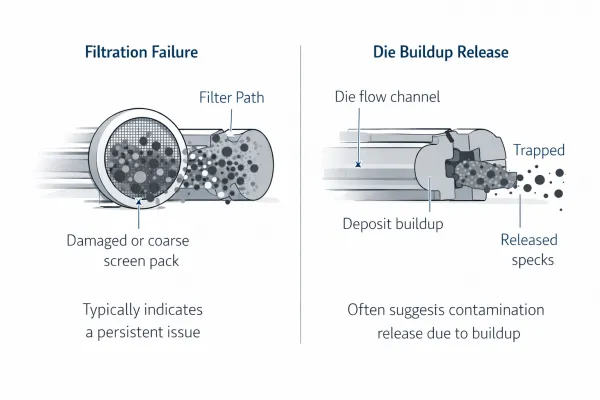
Filtration failure means contamination already exists upstream and passes through the filter. Causes include mesh that is too coarse, a damaged screen pack, poor sealing, bypass around the pack or a continuous screen changer that is not advanced often enough.
Die build-up means the die or adapter becomes the source. Material accumulates in a low-flow zone, degrades, and releases in fragments. This often creates periodic specks, repeated marks in similar product positions or contamination that improves immediately after die cleaning and then returns over days or weeks.
The distinction matters. Filtration problems need screen-pack and seal decisions. Die build-up needs cleaning, flow-path inspection and sometimes tooling correction.
7. Diagnostic Table
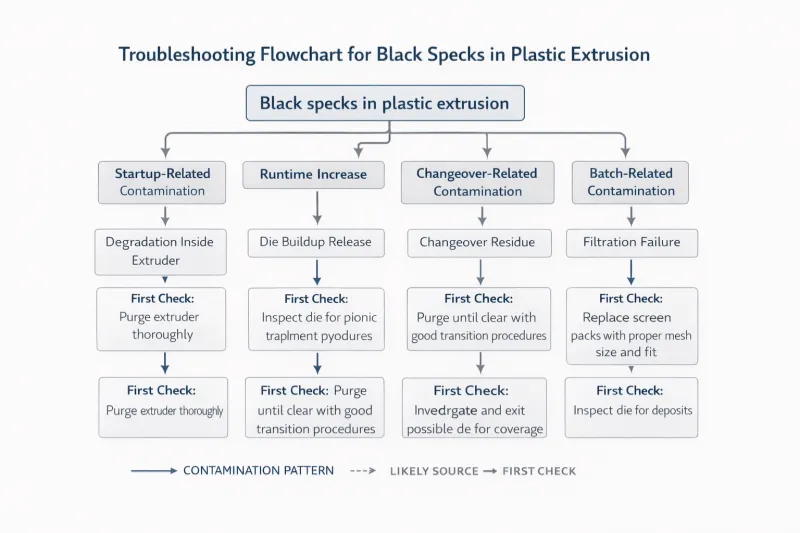
| Contamination pattern | Most likely source | First check |
|---|---|---|
| Worse after startup or restart | Degradation or retained carbonized material | Heat history, residence time, stop duration. |
| Increases steadily with runtime | Degradation or die build-up | Die lip, adapter and dead-spot accumulation. |
| Spikes after color or material change, then slowly decreases | Changeover residue | Purge effectiveness and hidden retention zones. |
| Tied to a specific material batch or regrind lot | Raw material or handling contamination | Material sample, regrind quality and conveying path. |
| Changes noticeably after screen change | Filtration problem | Screen pack condition, mesh size and sealing. |
| Periodic specks at regular intervals | Die build-up releasing in cycles | Die flow path, lip area and adapter dead spots. |
| Persists across material, batch and changeover | Internal degradation or chronic flow-path issue | Screw/barrel condition, adapter geometry and die zones. |
| Appears mainly at high line speed | Filtration capacity or heat/residence issue | Screen area, pressure trend, cooling and throughput match. |
8. What to Avoid
Avoid raising temperature blindly. Higher heat may push some residue out, but it can also accelerate degradation and create more carbonized material. Avoid running purge forever when the pattern is no longer improving. If purge clears the line briefly and the same specks return, the source may be a dead spot, die deposit or ongoing material contamination.
Also avoid treating every black speck as a screen-changer problem. Filtration matters, especially with recycled or contaminated material, but a screen cannot solve degraded material that is being generated downstream of the screen or released from the die lip.
Conclusion
Black specks in extrusion should be diagnosed by pattern, not by panic. The same visual defect can come from heat degradation, changeover residue, incoming material contamination, filtration bypass or die build-up. The best response is to narrow the source before choosing the intervention.
The practical sequence is simple: read the pattern, separate internal from external, check recent events, inspect low-cost points, and then clean or repair the area that the evidence supports. That approach reduces downtime and prevents repeated cleaning that never reaches the true source.
FAQ
What causes black specks in extrusion?
Common causes include degraded polymer, long residence time, retained material after changeover, contaminated regrind, foreign particles, screen pack bypass and die build-up.
Are black specks the same as gels?
Not always. Gels are usually unmelted or crosslinked polymer defects, while black specks are dark or burned particles. In practice they can appear together, so the page covers both as related contamination symptoms.
Should I stop the line immediately when black specks appear?
Not automatically. If safety and product requirements allow, first record the pattern, inspect material, review screen history and check recent process events. Shutdown should match the evidence.
How do I know if the problem is raw material contamination?
Switch to a clean material source or reduce regrind. If the defect follows one batch, supplier, regrind lot or conveying path, external contamination is more likely than barrel degradation.
Why do black specks return after cleaning?
The source may not be the part that was cleaned. Recurrence can come from die dead spots, incomplete purge, ongoing regrind contamination, screen bypass or a hot-hold practice that keeps generating degraded material.
When is screw and barrel cleaning necessary?
It is justified when evidence points to retained or carbonized material inside the screw/barrel system, especially after repeated purge failure, long hot holds, recurring startup contamination or visible degradation history.
Need Help Tracing Contamination?
Send the material grade, regrind ratio, contamination pattern, startup/changeover history, screen change history and photos of the defect. Those details help narrow whether the source is degradation, changeover residue, raw material contamination, filtration failure or die build-up.
Jason Shen
Founder and Lead Engineer, Jinxin ExtruderJason Shen leads Jinxin Extruder's single screw extrusion line projects, with hands-on experience in machine configuration, tooling adjustment, factory testing and extrusion troubleshooting.
Inquiry
Email Your Line Requirements
For an accurate quotation, include your target product, material, size range, expected output, factory voltage and any product drawing or sample requirements.